
Create your Capassa account
The next step happens with our secure sign-in provider. It's still Capassa, just a separate window run by Microsoft.
1. Find "Sign up now"
Look for the small green link near the top, not the big sign-in buttons.
2. Fill in a short form
Just five fields: email, verification code, password, and name.
3. Verify with BankID
A quick, secure confirmation that it's really you.
4. Connect your accounting system
Choose the system you use today, and authorize access.
5. See your insight right away
Your dashboards fill with your numbers automatically.
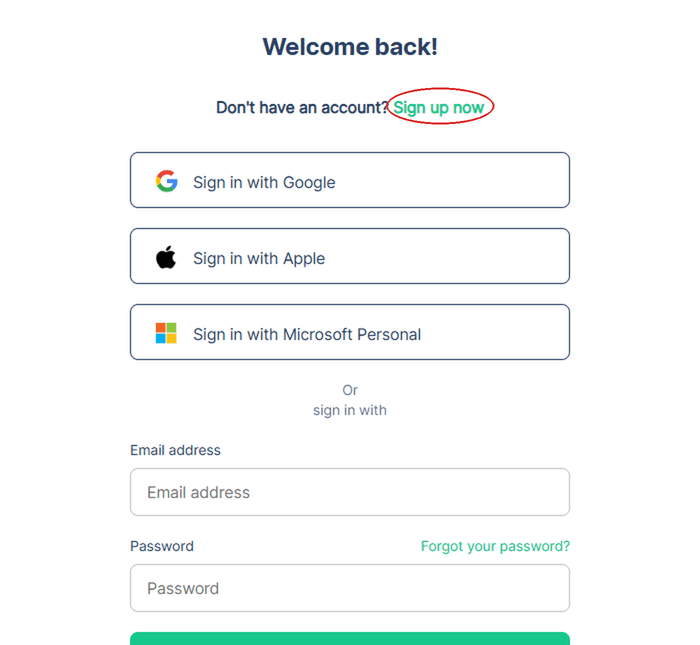
Step 1: Look for this link
You'll see a heading that says "Welcome back!". Don't let that confuse you, it applies to new users too. Look for the green "Sign up now" link next to it, not the email/password fields below, those are only for existing accounts. This is a known point where customers have lost track.
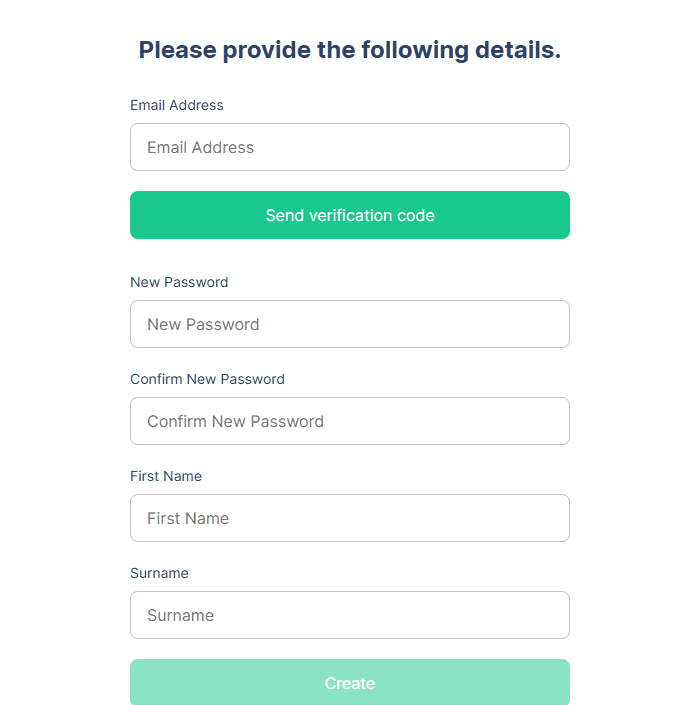
Step 2: The form is short
Email, a verification code sent to that email, password, first name, and surname. That's it. No company information or org number is needed to create the user itself.
Your account is created on a separate, secure domain (digitalcfo.capassa.com), run by Capassa and protected by Microsoft Azure. No credit card, no commitment.